Compare the best AI stem splitter options for extracting vocals, drums, bass, and instrument stems for remixing, practice, content creation, and live performance workflows.
An AI stem splitter separates a finished song into usable parts such as vocals, drums, bass, piano, guitar and other instruments. For producers and DJs, the best AI stem splitter is the one that gives clean vocal isolation, low drum bleed, fast exports and predictable files you can use in a DAW, remix, karaoke track or live visual workflow.
If your goal is performance content, split stems first, then send the clean audio parts into REACT so visuals can follow drums, vocals or bass separately. For launch notes and workflow updates, join the Compeller newsletter.
How AI stem splitter tools separate mixed songs into usable vocal, drum, bass, and instrument stems.
AI stem splitters are advanced software tools that use artificial intelligence to separate mixed audio tracks into their individual components, commonly known as "stems." These powerful systems can isolate vocals, drums, bass, guitars, and other instruments from a fully mixed song, even when the original multitrack recordings are unavailable.
Unlike traditional audio separation methods, which often produced low-quality results with significant artifacts, modern AI-powered stem splitters can achieve remarkably clean separation with minimal sonic degradation. This technology has revolutionized remixing, sampling, karaoke creation, music education, and audio restoration.
The latest generation of AI stem splitters uses deep learning models trained on vast datasets of isolated instrument recordings and mixed music. These sophisticated neural networks can identify and extract specific sound sources from complex audio mixtures, preserving the tonal characteristics and nuances of each instrument.
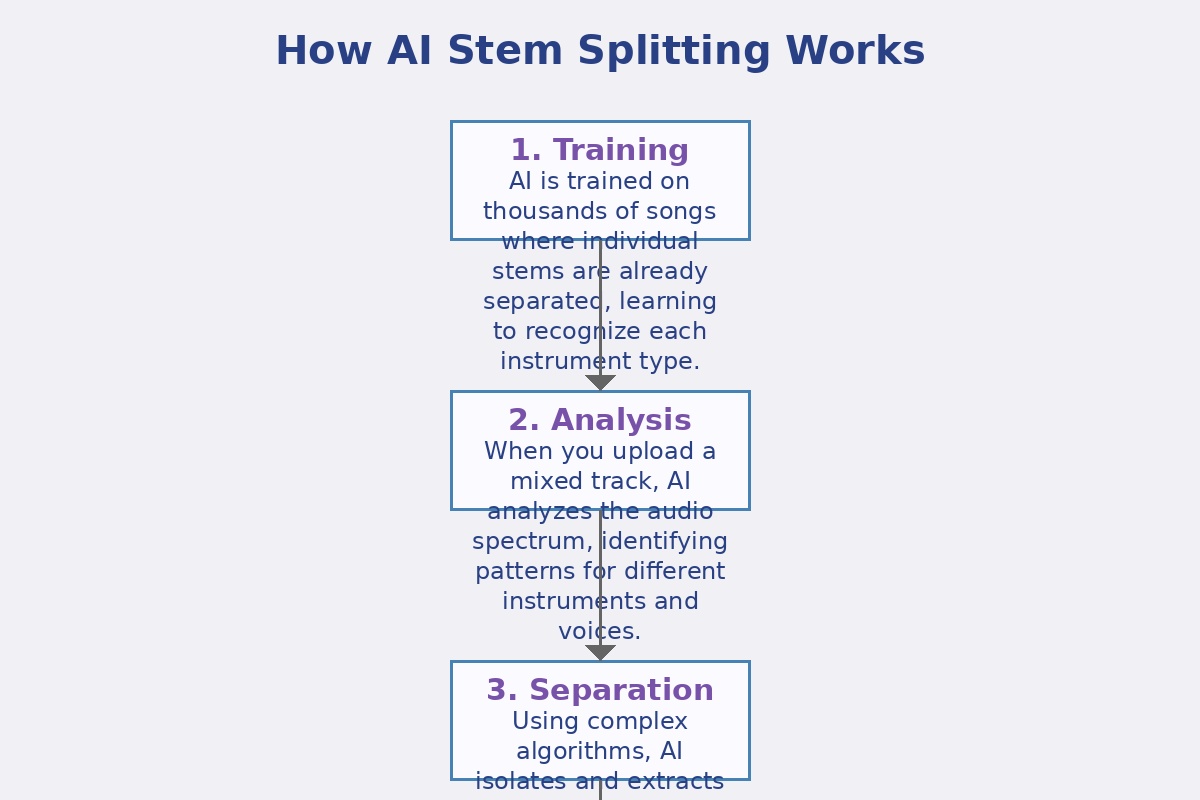
Understanding the technology behind audio source separation.
AI stem splitting involves a sophisticated process that analyzes mixed audio and separates it into individual components. Most modern systems use deep neural networks trained on thousands of hours of music to understand the unique characteristics of different instruments and voices.
The AI analyzes the mixed audio track, identifying patterns, frequencies, and characteristics associated with different instruments and voices. This creates a detailed "map" of the audio content.
Using trained neural networks, the system identifies different sound sources within the mix. It recognizes the unique spectral and temporal patterns of vocals, drums, bass, and other instruments.
The AI applies sophisticated algorithms to isolate and extract each identified sound source while minimizing interference from other elements. This process creates separate audio streams for each component.
The separated stems are rendered as individual audio files, typically in formats like WAV or MP3. Most systems allow you to export specific combinations of stems or all stems individually.
Find the right AI stem splitter for remixing, practice, sample prep, and creator workflows.
With several AI stem splitter tools available, it helps to compare their strengths, limitations, and best-fit workflows. Use this table to choose the right AI stem splitter for production, remixing, DJ prep, karaoke creation, or education.
| Tool | Best For | Free Tier | Separation Quality | Number of Stems | Processing Speed | Export Options |
|---|---|---|---|---|---|---|
| Compeller.ai | All-purpose separation | Yes (Forever) | ***** | Up to 6 | Very Fast | WAV, MP3, FLAC |
| Lalal.ai | Vocal extraction | Limited | ***** | 2-5 | Fast | WAV, MP3 |
| Moises.ai | Musicians & practice | Limited | ***** | 4-5 | Medium | WAV, MP3 |
| Spleeter | Developers & technical users | Yes (Open Source) | ***** | 2-5 | Depends on hardware | WAV |
| XTRAX STEMS | DJs & remixers | No | ***** | 3 | Medium | WAV, MP3 |
| iZotope RX | Professional audio engineers | No | ***** | Variable | Medium | All formats |
Detailed reviews of the best AI audio separation tools available today.
Our top recommendation for comprehensive AI stem splitter workflows. Compeller.ai offers strong separation quality with minimal artifacts, supporting up to 6 stems including vocals, drums, bass, piano, guitar, and other instruments. It also pairs naturally with REACT when DJs and visual performers want separated audio assets feeding wider show workflows.
Need visuals too? Pair stem prep with REACT and keep up with launch updates through the Compeller newsletter.
Specializing in vocal extraction, Lalal.ai offers impressive separation quality for isolating vocals from instrumental backgrounds. It's particularly effective for creating karaoke tracks or isolating vocal performances.
Designed with musicians in mind, Moises.ai combines stem separation with practice tools like tempo adjustment and pitch shifting. It's ideal for learning songs, transcribing parts, or creating practice tracks.
An open-source solution developed by Deezer, Spleeter offers powerful separation capabilities for technically-inclined users. It requires some programming knowledge but provides excellent results for free.
Discover how audio separation technology is transforming music production and beyond.
Extract specific elements from existing tracks to create remixes or incorporate samples into new productions. Isolate vocals for a remix or extract drum breaks for sampling without unwanted background elements.
Remove vocals from songs to create high-quality karaoke backing tracks. Modern AI stem splitters can remove vocals while preserving background vocals and effects, resulting in professional-quality karaoke tracks.
Isolate specific instruments to study performances, transcribe parts, or practice playing along with specific elements. Musicians can focus on learning bass lines, drum patterns, or guitar solos by isolating those instruments.
Separate elements of historical recordings for restoration or remastering. By isolating vocals or instruments, audio engineers can apply targeted processing to improve sound quality or fix issues.
Extract music elements for film scoring, sound design, or dialogue isolation. Separate dialogue from background music in a scene, or isolate specific musical elements for creative sound design.
Create custom backing tracks by removing or isolating specific elements from original recordings. Performers can create backing tracks that emphasize or de-emphasize certain instruments based on their live setup.
Maximize the quality of your separated stems with these expert tips.
Start with the highest quality audio file available. Higher bitrate files provide more information for the AI to work with, resulting in cleaner separation. Lossless formats like WAV or FLAC will yield better results than compressed MP3s.
More stems isn't always better. If you only need vocals and instrumentals, choose a 2-stem separation for optimal quality. The more stems you request, the more challenging the separation becomes, potentially introducing more artifacts.
Different AI models perform better with certain genres. Some tools allow you to select genre-specific models. For example, a model trained on pop music might struggle with classical orchestral pieces or heavy metal tracks.
Apply gentle processing to separated stems to improve quality. Light EQ, noise reduction, or reverb can help mask minor artifacts or separation issues. Be subtle to avoid introducing new problems.
Different AI stem splitters have different strengths. One tool might excel at vocal extraction while another might handle drums better. For critical projects, try multiple tools and choose the best result for each stem.
When recombining stems, watch for phase cancellation issues. If the sum of your stems sounds thin or hollow compared to the original, adjust the phase relationship between stems or use the original mix as a reference layer.
Use Compeller.ai when you need fast, clean stem extraction, then connect the result to REACT, remix prep, karaoke workflows, or content production. If you want product updates and launch notes, join the newsletter as well.
Try Compeller.ai Free Try REACT Join the newsletter Visit Compeller.ai